Installation
For a more detailed explaination on how to install plugins, check out https://grafana.com/docs/grafana/v9.1/plugins/installation/
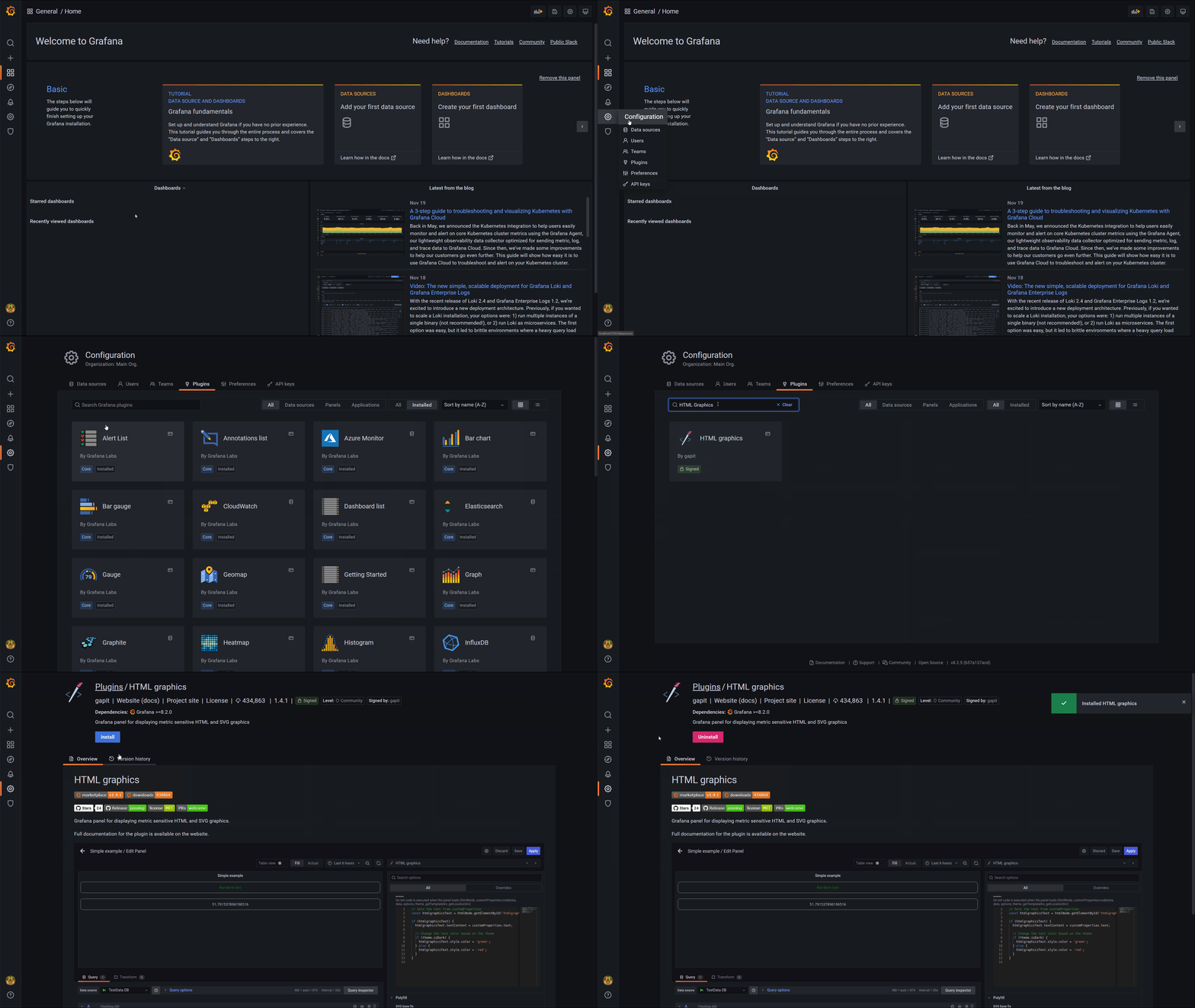
Install using the plugin catalog
Plugin catalog came out in v8.0 of Grafana.
More information about plugin catalog https://grafana.com/docs/grafana/v9.1/plugins/catalog/
Configuration > Plugins > HTML Graphics
Install using grafana-cli
More information about grafana-cli https://grafana.com/docs/grafana/v9.1/administration/cli/
To install the latest version of the plugin, run the following command on the Grafana server:
- Linux
- macOS
- Windows
- Latest (Grafana)
- Latest (Github)
- Specific version
grafana-cli plugins install gapit-htmlgraphics-panel
grafana-cli --pluginUrl https://github.com/gapitio/gapit-htmlgraphics-panel/releases/latest/download/gapit-htmlgraphics-panel.zip plugins install gapit-htmlgraphics-panel
The specific version link can be obtained by copying the asset link from Releases on the GitHub project page
grafana-cli --pluginUrl https://github.com/gapitio/gapit-htmlgraphics-panel/releases/download/v2.2.3/gapit-htmlgraphics-panel-2.2.3.zip plugins install gapit-htmlgraphics-panel
- Latest (Grafana)
- Latest (Github)
- Specific version
grafana-cli plugins install gapit-htmlgraphics-panel
grafana-cli --pluginUrl https://github.com/gapitio/gapit-htmlgraphics-panel/releases/latest/download/gapit-htmlgraphics-panel.zip plugins install gapit-htmlgraphics-panel
The specific version link can be obtained by copying the asset link from Releases on the GitHub project page
grafana-cli --pluginUrl https://github.com/gapitio/gapit-htmlgraphics-panel/releases/download/v2.2.3/gapit-htmlgraphics-panel-2.2.3.zip plugins install gapit-htmlgraphics-panel
- Latest (Grafana)
- Latest (Github)
- Specific version
grafana-cli.exe plugins install gapit-htmlgraphics-panel
grafana-cli.exe --pluginUrl https://github.com/gapitio/gapit-htmlgraphics-panel/releases/latest/download/gapit-htmlgraphics-panel.zip plugins install gapit-htmlgraphics-panel
The specific version link can be obtained by copying the asset link from Releases on the GitHub project page
grafana-cli.exe --pluginUrl https://github.com/gapitio/gapit-htmlgraphics-panel/releases/download/v2.2.3/gapit-htmlgraphics-panel-2.2.3.zip plugins install gapit-htmlgraphics-panel
Install manually
- Go to Releases on the GitHub project page
- Find the release you want to install
- Download the release by clicking the release asset called
gapit-htmlgraphics-panel-<version>.zip. You may need to uncollapse the Assets section to see it. - Unarchive the plugin into the Grafana plugins directory
- Linux
- macOS
- Windows
unzip gapit-htmlgraphics-panel-<version>.zip
mv gapit-htmlgraphics-panel /var/lib/grafana/plugins
unzip gapit-htmlgraphics-panel-<version>.zip
mv gapit-htmlgraphics-panel /usr/local/var/lib/grafana/plugins
Expand-Archive -Path gapit-htmlgraphics-panel-<version>.zip -DestinationPath C:\grafana\data\plugins
- Restart the Grafana server to load the plugin
Docker compose
- Latest (Grafana)
- Latest (Github)
- Specific version
version: '3'
services:
  grafana:
    image: grafana/grafana
    container_name: grafana
    restart: always
    networks:
      - grafana
    ports:
      - 3000:3000
    environment:
      - GF_INSTALL_PLUGINS=gapit-htmlgraphics-panel

networks:
  grafana:
    name: grafana
version: '3'
services:
grafana:
  image: grafana/grafana
  container_name: grafana
  restart: always
  networks:
    - grafana
  ports:
    - 3000:3000
  environment:
    - GF_INSTALL_PLUGINS=https://github.com/gapitio/gapit-htmlgraphics-panel/releases/latest/download/gapit-htmlgraphics-panel.zip;gapit-htmlgraphics-panel

networks:
grafana:
  name: grafana
The specific version link can be obtained by copying the asset link from Releases on the GitHub project page
version: '3'
services:
grafana:
  image: grafana/grafana
  container_name: grafana
  restart: always
  networks:
    - grafana
  ports:
    - 3000:3000
  environment:
    - GF_INSTALL_PLUGINS=https://github.com/gapitio/gapit-htmlgraphics-panel/releases/download/v2.2.3/gapit-htmlgraphics-panel-2.2.3.zip;gapit-htmlgraphics-panel # v2.2.3

networks:
grafana:
  name: grafana